Dunkin’
- 4.6
- Rating
- 10.00M
- Installs
- Free
- Price
 Analysis by App-foxy
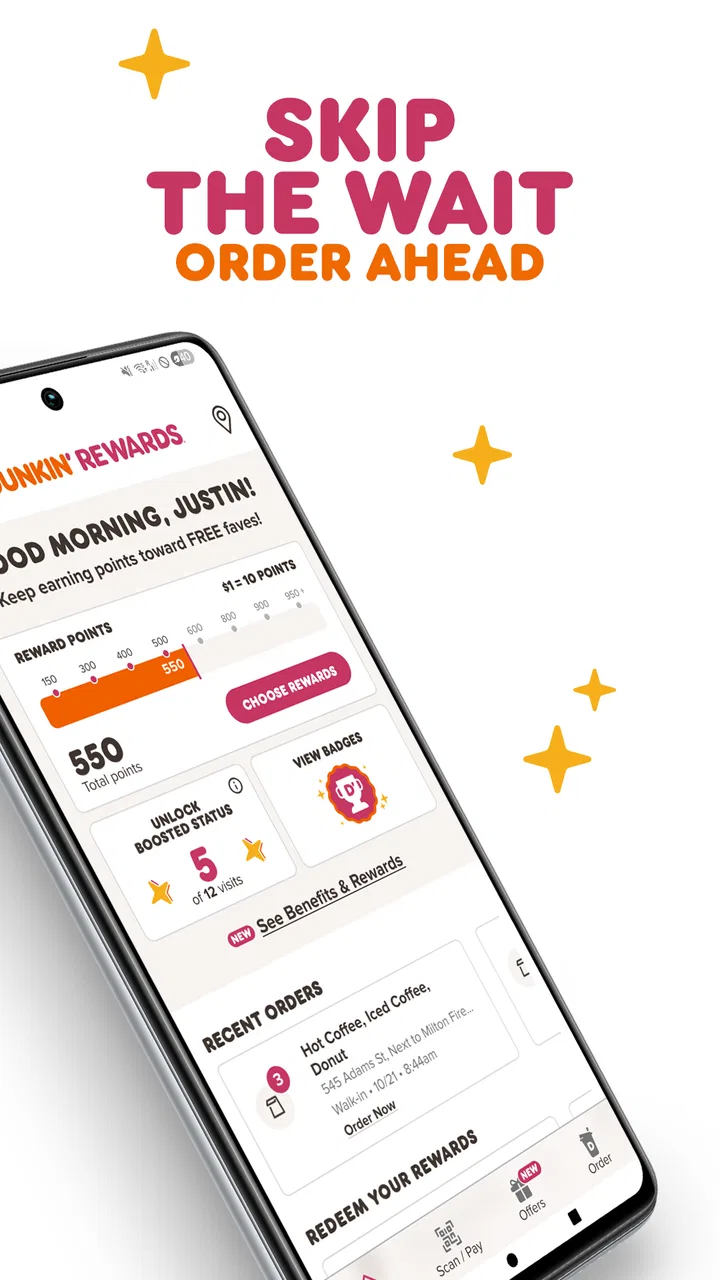
I use Dunkin’ when I want to make a coffee stop quicker rather than turn it into another small decision during a busy morning. The app is a free Food & Drink app from Dunkin' Brands, Inc., built around ordering ahead and collecting rewards. That sounds simple, but the useful part is how those two jobs fit together: I can look over the menu before reaching the store, place an order when I know what I want, and keep my purchases connected to the same account instead of handling everything at the counter.
My overall impression is positive, especially for regular Dunkin’ customers. It is not a general restaurant-discovery tool, and it is not meant to replace every way of ordering. Its value depends on whether you visit Dunkin’ often enough to appreciate a faster repeat routine. If you are already stopping there several times a month, the app can make those visits feel more organized. If you only go occasionally, the rewards side may matter less, and ordering directly in person may remain just as convenient.
How Dunkin’ fits into a real morning routine
I use Dunkin’ most effectively when I settle the basics before the rush: what I want, which store fits my route, and whether I’m ordering just for myself or for someone else. That small bit of planning keeps the app from becoming another distraction on a busy morning. The next section looks at how its focused menu-and-rewards setup compares with the other ways I can place a coffee order.
You May Also Like

 Blood Strike: 2.5 Anniversary
Blood Strike’s Loadouts Turn Every Drop Into a Tactical Gamble
A close look at Blood Strike’s custom loadouts: how fast access to signature weapons reshapes its battle royale rhythm, rewards preparation, and narrows the gap between fights.

 Pandora - Music & Podcasts
Pandora’s Music Is Easy to Start, but Harder to Recover
Pandora’s strength is its low-effort path from a seed to a station. Its weak spot is how much confidence it asks you to place in connection, setup, and quiet recovery.

 8 Ball Pool
 Is Built on Rivalries, Rematches, and Routine
A close look at the rivalries, rematches, shared routines, and unanswered safety questions that turn a quick pool match into a persistent mobile community.

 Samsung Music
’s Quiet Strength Is Playing What You Already Own
Its reach comes less from spectacle than from dependable access to a personal library. That simplicity is both the app’s strongest retention engine and its ceiling.

 AccuWeather: Weather Radar
AccuWeather Review: A Quick, Clear Forecast for Everyday Decisions
For everyday plans, the best forecast is the one you can understand quickly. AccuWeather makes rain timing, radar, and local conditions easy to act on, with a few trade-offs.

 Hill Climb Racing
Why Hill Climb Racing Still Turns Crashes Into One More Run
A tiny car, a bumpy hill and one more upgrade: Hill Climb Racing keeps resurfacing because its simple chaos makes every near-miss feel personal.
More From Our News Desk
View All News


More than a digital menu
The most practical way I see this app is as a preparation tool. Instead of arriving at the store, studying the menu while people wait behind me, and trying to remember every customization, I can make those decisions earlier. That is particularly helpful when I want a specific drink or food combination and do not want to slow down at the register.
A realistic example is a weekday commute. I may be leaving home with only a few minutes to spare, but I still want coffee and breakfast. With Dunkin’, I can open the menu before I leave, choose my items, review the order, and send it ahead when that option suits the visit. By the time I reach the location, the important work is already done. The benefit is not only speed; it also reduces the pressure of making choices while standing in line.
I would still check the selected store carefully before confirming anything. A familiar order does not automatically mean the same location is convenient that day. A nearby shop may be on the wrong side of the road, while another one may fit the route better. Treating the location step as part of the order, rather than tapping through it quickly, is one of the easiest ways to avoid an unnecessarily awkward pickup.
Where the free price matters
The app itself is free, so trying it does not require a purchase commitment. That makes the decision fairly straightforward: install it if you already buy from Dunkin’ and want a digital ordering and rewards routine; skip it if you are looking for a standalone entertainment app or a broad comparison of coffee shops. The free access is the clearest part of its value, while the financial usefulness of using it regularly depends on how often you make eligible purchases and how much you personally use the rewards experience.
I would not describe the app as automatically saving money simply because it is installed. The sensible approach is to use it for purchases I would have made anyway. Ordering an extra drink just to chase a reward can erase the benefit quickly. In my view, the app works best as a record-and-routine tool, not as a reason to visit more often than I intended.
That distinction is important for anyone comparing it with paying at the counter. There is no app purchase price to recover, but the app still asks for a little attention: choosing the right store, checking the order, and remembering to use the account consistently. For a frequent customer, that small effort can be worthwhile. For someone who visits Dunkin’ only once in a while, the practical return may be too small to notice.
Rewards are most useful when they match your habits
The rewards element gives the app a reason to remain installed after the first order. I like the idea of keeping visits in one place because it makes the app more useful than a simple digital menu. However, I would judge it by my normal buying pattern rather than by the promise of a future benefit. If my usual routine already includes Dunkin’ coffee or breakfast, earning through that routine feels natural. If not, the rewards feature is less persuasive.
A good personal habit is to review the account before placing a repeat order. That helps me remember whether I am ordering while signed in and whether I am using the account I actually intend to keep. It is an unglamorous step, but it matters: a beautifully prepared order is less useful if it is detached from the rewards activity I expected to collect.
I also prefer to decide my order before opening the app when I am in a hurry. Knowing whether I want a drink only, breakfast as well, or a familiar combination keeps the process focused. Browsing every possibility at the last second can make the app feel slower than ordering face to face. The strongest workflow is preparation first, app second.
What the app delivers beyond ordering ahead
Dunkin’ brings together several tasks that are usually split between a menu board, a cashier, and a loyalty card. I can browse choices, build an order, and use the same app as the place where rewards activity is handled. That combination is the main reason I see it as worthwhile for repeat customers.
It also gives me more control over the decision stage. At a counter, I may feel rushed and forget a change I wanted to make. In the app, I have a chance to pause and inspect the order before committing. That is useful for people who are particular about their drink or who regularly repeat a customized breakfast order.
Still, convenience is not identical to certainty. An app can make the order clearer to me, but the store still has to prepare it correctly and have the selected items available. I would use the digital order to reduce communication friction, not assume that every possible issue has disappeared.
What version and platform details mean in practice
The current Android release is version 11.21.0.381, and the app requires Android 11 or newer. That is worth checking before planning around it, especially if you use an older phone that still handles your other daily apps comfortably. The age rating is Everyone, so the intended audience is broad rather than restricted to adults.
The app has been available since April 13, 2016, and its scale suggests that it has become a familiar tool for many Dunkin’ customers: it has more than ten million installs, an average rating of 4.6, and roughly 594 thousand ratings. Those figures do not guarantee that every individual experience will be smooth, but they do indicate that this is an established app rather than a new experiment.
I would treat the rating as a useful signal, not a substitute for matching the app to my habits. A person who orders ahead regularly may find it much more valuable than someone who prefers spontaneous counter service. The same app can feel essential to one customer and unnecessary to another.
The tradeoff between speed and flexibility
Ordering ahead is most helpful when my plan is stable. If I know which store I am visiting and what I want, the app can shorten the interaction. If my route changes constantly, I am undecided, or I want to ask a question before ordering, the counter may be better. Face-to-face ordering gives me immediate human interaction, while the app gives me more time to prepare privately.
That is the central tradeoff I noticed: Dunkin’ rewards routine more than spontaneity. The more predictable my order and travel pattern, the more value I get from setting things up in advance. The less predictable the visit, the more likely I am to spend time adjusting the order or reconsidering whether using the app was worthwhile.
There is also a mental tradeoff. Digital ordering feels efficient, but it can encourage me to focus on tapping through a familiar sequence instead of checking what I actually want. I find it helpful to pause at the review stage and read the complete order once. That small check is especially valuable when I am ordering for more than one person.
Compared with the usual alternatives
Compared with ordering at the counter, Dunkin’ is better when I value advance planning, a repeat order pattern, and keeping rewards activity connected to purchases. The counter is better when I need a quick conversation, have a question, or am still deciding. Neither method wins every situation, and I would not force myself to use the app for a visit where it adds steps rather than removing them.
Compared with relying only on a mobile browser or remembering a loyalty account without an app, the dedicated experience feels more natural for repeated visits. A regular app is easier to reach when I am already on the move, and it keeps the ordering habit separate from general web browsing. The advantage is convenience, not a guarantee of a lower total cost.
Compared with a general delivery platform, Dunkin’ is more focused on the Dunkin’ relationship itself: the menu, the order routine, and the rewards connection are all centered on one brand. A delivery service may be more useful when I want to compare restaurants or have food brought from several kinds of places. Dunkin’ makes more sense when I already know I want Dunkin’ and prefer a direct, focused route.
Small workflow choices that make a difference
My first tip is to build the order while I have time, but submit it only after confirming the store and the intended pickup plan. That separates browsing from commitment. I can explore without rushing, then make the final decision when I know the morning route has not changed.
My second tip is to use the app for repeatable orders rather than treating every visit as an experiment. A familiar order makes the app’s speed advantage obvious. For a new or complicated choice, I would allow extra time to inspect every selection instead of assuming the process will be instant.
My third tip is to think of rewards as a bonus attached to normal spending. I would not add unnecessary items merely to make the app feel more valuable. The strongest value comes when the app records purchases I already planned, helps me prepare them, and gives me a reason to keep using the same account.
My fourth tip is to keep the phone requirement in mind. If the battery is low, the connection is unreliable, or I am in a situation where handling the phone is inconvenient, the counter remains a practical fallback. A digital routine should make the visit easier, not leave me without a comfortable alternative when the circumstances change.
Who should use it and who should skip it
I would recommend Dunkin’ to regular customers who often order the same kind of breakfast or coffee, dislike waiting while deciding, and want rewards tied to their purchases. It is also a good fit for commuters who can identify their store and plan their route before arriving. For those users, the free app can deliver convenience without asking them to change their entire routine.
I would be less enthusiastic for someone who visits Dunkin’ rarely, prefers asking staff for recommendations, or frequently changes plans at the last moment. The app may still be useful for occasional browsing, but those users are less likely to benefit from the repeat-order and rewards workflow. Someone with an Android phone below the required operating-system level should also check compatibility before relying on it.
Families and small groups may appreciate preparing an order before reaching the store, but they should review the complete basket carefully. More items create more opportunities for a missed customization or an accidental selection. I find digital review helpful in that situation, provided I do not rush through the final screen.
My verdict on the free value
After using it as a practical ordering companion, I see Dunkin’ as a worthwhile free download for people who already choose Dunkin’ with some regularity. Its best qualities are focused rather than flashy: advance preparation, a clearer ordering process, and a rewards routine in one place. The app earns its space on my phone when it removes friction from visits I was going to make anyway.
My recommendation is to try it if your Dunkin’ visits are predictable, but skip it if you rarely go or prefer spontaneous counter service. The free price makes experimentation easy, yet free access should not be confused with guaranteed savings. The real value comes from using the app deliberately: select the right store, check the order, keep rewards connected to normal purchases, and use the counter when a conversation or a changing plan makes more sense.
With more than ten million installs and a strong average rating, it is clearly a popular choice, but popularity is not the deciding factor for me. The deciding question is simpler: will ordering ahead and keeping rewards in one place genuinely improve my next Dunkin’ stop? If the answer is yes, this app is a sensible addition to the routine. If the answer is no, the traditional order remains perfectly reasonable.
FAQs for Dunkin’
01What features does the Dunkin' app offer?
The Dunkin' app provides a variety of features designed to enhance your experience. You can order ahead to skip the line, earn points with every purchase through their DD Perks loyalty program, and receive exclusive offers and discounts. The app also allows you to customize your orders and find the nearest Dunkin' locations.
02Is the Dunkin' app free to use?
Yes, the Dunkin' app is free to download and use. There are no subscription fees, but the app does require you to create an account to access all its features, such as mobile ordering and the DD Perks program. In-app purchases are related to ordering food and beverages.
03How does the DD Perks loyalty program work?
The DD Perks program allows you to earn points with every purchase made through the app. For every dollar spent, you earn five points. Once you accumulate 200 points, you receive a free beverage reward. The program also offers special promotions, birthday treats, and bonus points opportunities.
04Can I customize my order using the Dunkin' app?
Absolutely! The app offers a detailed customization feature for both food and beverages. You can choose from various flavors, add-ons, and adjust the size of your order. This personalization ensures you get your order exactly how you like it, making your Dunkin' experience even more enjoyable.
05What should I do if the app is not working properly?
If you encounter issues with the Dunkin' app, first try restarting the app or your device. Ensure you have the latest version installed, as updates often fix bugs. If problems persist, contact Dunkin' customer support through the app or their website for further assistance. They can help resolve technical issues efficiently.
Pros
- User-friendly interface for easy navigation.
- Multiple payment options for convenience.
- Exclusive offers and rewards available.
- Order customization is simple and intuitive.
- Quick order history access for reorders.
Cons
- App occasionally experiences slow load times.
- Limited menu customization for dietary needs.
- Requires location access for store info.
- In-app notifications can be intrusive.
- Some features require stable internet.

Dunkin’
Gallery